
• Home
  • About this blog

Ricky Leong

~ Random Musings

Ricky Leong

Tag Archives: apple

iPhone 4S standby — I think we’ve got an answer

17 Monday Oct 2011

Posted by Ricky Leong in Apple, iPhone, technology

≈ Leave a comment

Tags

apple, battery, battery life, iOS, iPhone, iPhone 4S, smartphone, standby, standby time

Tech/Apple geeks everywhere have been curious as to why the Apple 4S has 100 fewer hours of standby time than its predecessors.
Indeed, It claims only a maximum of 200 hours of standby time now, versus 300 hours with older iPhones.
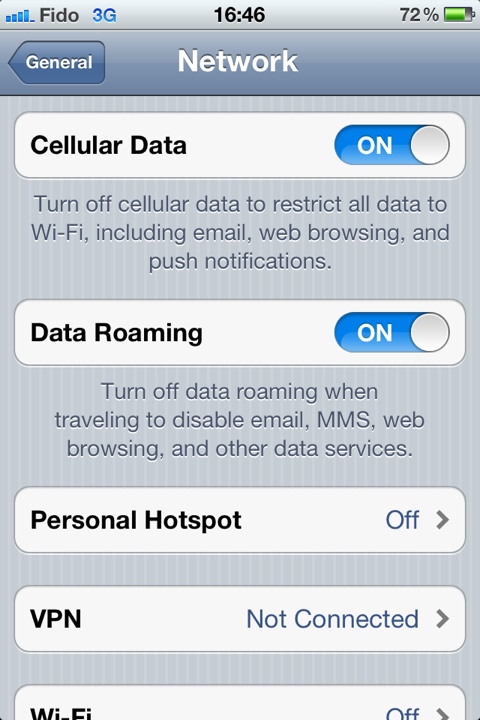
I’ve got another guess as to why this is so: You can no longer force your iPhone to operate only on 2G (EDGE).
I might have been the only iPhone user to deliberately use a slower cellular network most of the time, but I’d done so to reduce battery consumption while the phone was idle.
With light usage and limiting the phone to 2G (turning 3G on only when I needed it) I could go three, four or sometimes even five days between recharges.
As I giddily unwrapped and set up the iPhone 4S that arrived this morning, I flicked through the menus only to find the “enable 3G” option is gone.
Too bad. It was a neat little trick to help reduce energy consumption.
Perhaps, if I beg hard enough, Apple will bring it back?

20111017-180052.jpg

Share this:

  • Click to email a link to a friend (Opens in new window) Email
  • Click to share on Facebook (Opens in new window) Facebook
  • Click to share on X (Opens in new window) X
  • More
  • Click to share on Reddit (Opens in new window) Reddit
  • Click to share on Tumblr (Opens in new window) Tumblr
  • Click to share on LinkedIn (Opens in new window) LinkedIn
  • Click to share on Pinterest (Opens in new window) Pinterest
  • Click to print (Opens in new window) Print
Like Loading...

iOS 5 — The first 24 hours

13 Thursday Oct 2011

Posted by Ricky Leong in Apple, iPhone, technology

≈ Leave a comment

Tags

apple, cellular, iOS 5, iPhone, mobile, operating system, smartphone

I’ve had iOS 5 installed on my iPhone 4 since it became available shortly before lunch on Oct. 12. Here are some quick and dirty impressions after about a day of use.

Installation: Pretty painless. The download took only a few minutes over broadband Internet. The process of backing up and restoring my iPhone took a fair amount of time — more than 30 minutes.

iCloud: Upon turning on for the first time after the OS update, the phone asked me if I wanted to sign up for iCloud. I accepted. The process took only a few minutes, no doubt shortened because I already had an iTunes/Apple ID account.
I was able to use the set which parts of my iPhone’s content I wanted to back up in the cloud. It doesn’t take much to start gobbling up the seemingly massive 5 GB of backup space. It makes sense, though: My camera roll items are almost 2 GB to just to themselves.
I still haven’t fully explored the capabilities of iCloud. Once I’ve done so, I’ll report back to you.

Notifications in general: I love the new notifications screen. With a swipe of the finger from the top of the screen, I can call up the weather and stocks info without switching apps.
If I’ve skipped calls, text messages, reminders and other such messages, they all queue up there for viewing.
You can set which programs get to live in the notifications screen and how they alert you.
The notifications screen is also available in your lock screen but only if there are new messages/alerts to show you. You’ll see a ridged tab-like icon near the clock, which you can drag down to reveal the notifications.

Messaging/phone call notifications: When I got a text message whilst setting up my phone, the message innocuously dropped down from the top of the screen in a small banner and discretely retreated a few seconds later. Clicking on the message as it appears or selecting it later from the notifications screen will invoke the messaging app for me to respond.
If you prefer the old-school, intrusive text message notification, you can choose “Alert” under Settings > Notifications > Messages > Alert Style.
Phone calls, calendar items and timed reminders have the intrusive “Alert” notifications as a default.

The app formerly known as iPod: Apple has split the music and video portions of the former iPod app and called them — you guessed it — Music and Video respectively.

Newsstand: As the name of this app suggests, this is a Books-style app for newspapers and periodicals. Currently, the Canadian app store has a very limited number of titles for sale. The only icon my Newsstand contains is one for The New York Times, a virtual copy of the standalone NYT app I already own.

Camera from the lock screen: It took me a few hours to figure out that you have to double-click the home button to access the native Camera app from the lock screen. (It’s the same process you’d use to access Music controls when your phone is locked.)
You won’t have access to the full contents of your camera roll until you unlock the phone.

Auto-lock while using AirPlay: Some video-streaming apps (including Livestation and the National Film Board, for example) used to prevent the phone from locking itself while playing. However, this isn’t happening anymore when streaming to Apple TV using AirPlay. If you have auto-lock selected, the app stops and your phone locks after the set time interval elapses. Seems like a bug.
In contrast, the phone does not lock if the video is streaming through iPhone itself.

Other considerations: To allow for iCloud, some iOS 5 features and some feature exclusive to the upcoming iPhone 4S, the following may require a software update.
• The OS on your Mac
• iTunes
• iPhoto, Aperture, iMovie

So those are my initial observations and impressions of iOS 5. Check back in a few days to give me a chance to put the operating system to the test under extended, everyday use.

Share this:

  • Click to email a link to a friend (Opens in new window) Email
  • Click to share on Facebook (Opens in new window) Facebook
  • Click to share on X (Opens in new window) X
  • More
  • Click to share on Reddit (Opens in new window) Reddit
  • Click to share on Tumblr (Opens in new window) Tumblr
  • Click to share on LinkedIn (Opens in new window) LinkedIn
  • Click to share on Pinterest (Opens in new window) Pinterest
  • Click to print (Opens in new window) Print
Like Loading...

Hardware solution to Safari 5 trouble. Really!

22 Tuesday Jun 2010

Posted by Ricky Leong in Internet

≈ 3 Comments

Tags

airport extreme, apple, browser, bug, chrome, DNS, fix, mac, prefetch, prefetching, router, safari, trouble

This whole Safari trouble got me surveying some people around me who use Macs and had upgraded to Safari 5.
My best bud, who has a late-model Airport Extreme, has had no trouble whatsoever. Another fella, who has a router as old as mine, was having the same trouble as I was. On the Internet, posts from Mac help forums users suggested people with no trouble possessed newer-model routers.
While skeptical about this Safari trouble being fixable by hardware, I figured I would sink some money on a new router. (I was going to do it anyhow.)
Lo and behold … all my troubles are gone.
And as a side bonus, I can better wireless throughput and can now print through my router. Just waiting to add a large network drive to back up my data.
But that’s not the point.
Not everyone can go and splurge on a new router just because Apple decided to upgrade their Web browser. Surely there is some software fix for whatever hardware trouble people are encountering.
This brings me back to my original hunch: Someone at Apple needs to add a check box to disable DNS prefetching. My gut tells me that’s been the problem all along. That’s how I “fixed” Chrome when its DNS prefetch feature continually caused my Internet connection to time out.
But is anybody at Apple listening?

Share this:

  • Click to email a link to a friend (Opens in new window) Email
  • Click to share on Facebook (Opens in new window) Facebook
  • Click to share on X (Opens in new window) X
  • More
  • Click to share on Reddit (Opens in new window) Reddit
  • Click to share on Tumblr (Opens in new window) Tumblr
  • Click to share on LinkedIn (Opens in new window) LinkedIn
  • Click to share on Pinterest (Opens in new window) Pinterest
  • Click to print (Opens in new window) Print
Like Loading...

Well, not quite done yet

16 Wednesday Jun 2010

Posted by Ricky Leong in Internet

≈ Leave a comment

Tags

apple, errors, mac, safari

Reseting my prefs helped things a bit but those errors are still happening. Grr.

Share this:

  • Click to email a link to a friend (Opens in new window) Email
  • Click to share on Facebook (Opens in new window) Facebook
  • Click to share on X (Opens in new window) X
  • More
  • Click to share on Reddit (Opens in new window) Reddit
  • Click to share on Tumblr (Opens in new window) Tumblr
  • Click to share on LinkedIn (Opens in new window) LinkedIn
  • Click to share on Pinterest (Opens in new window) Pinterest
  • Click to print (Opens in new window) Print
Like Loading...

Reset your preferences!

14 Monday Jun 2010

Posted by Ricky Leong in Internet

≈ Leave a comment

Tags

apple, mac, safari, update

After reading some more about other people’s Safari 5 woes, I decided to reset Safari and trash the files containing Safari’s cache and preferences. Lo and behold, it seems to have solved my woes … Stay tuned.

Share this:

  • Click to email a link to a friend (Opens in new window) Email
  • Click to share on Facebook (Opens in new window) Facebook
  • Click to share on X (Opens in new window) X
  • More
  • Click to share on Reddit (Opens in new window) Reddit
  • Click to share on Tumblr (Opens in new window) Tumblr
  • Click to share on LinkedIn (Opens in new window) LinkedIn
  • Click to share on Pinterest (Opens in new window) Pinterest
  • Click to print (Opens in new window) Print
Like Loading...

Solution to Safari 5 DNS woes?

11 Friday Jun 2010

Posted by Ricky Leong in Internet

≈ Leave a comment

Tags

apple, DNS, mac, safari

Several discussion groups at apple.com suggest changing the DNS server settings on your computer to those from Google Public DNS instead of those from your ISP. I’m giving it a try … will report back.

Share this:

  • Click to email a link to a friend (Opens in new window) Email
  • Click to share on Facebook (Opens in new window) Facebook
  • Click to share on X (Opens in new window) X
  • More
  • Click to share on Reddit (Opens in new window) Reddit
  • Click to share on Tumblr (Opens in new window) Tumblr
  • Click to share on LinkedIn (Opens in new window) LinkedIn
  • Click to share on Pinterest (Opens in new window) Pinterest
  • Click to print (Opens in new window) Print
Like Loading...

“Safari can’t find the server”

10 Thursday Jun 2010

Posted by Ricky Leong in Internet, media

≈ 7 Comments

Tags

apple, DNS, error, errors, mac, prefetch, safari

But the server is there, I swear!
I wrote early this morning I couldn’t replicate an error in Safari 5 I had been experiencing through the previous day, where the browser would tell me it could not connect to a server even though the server was just fine.
Since I posted that message, the error came up again — and I got some screen grabs for you.
When confronted with the error message …

201006-SafariFail1 20100610-SafariFail3

… I hit the refresh button to reveal the webpages:

20100610-SafariFail2 20100610-SafariFail4

Anyone else in cyberspace experiencing this trouble?

Share this:

  • Click to email a link to a friend (Opens in new window) Email
  • Click to share on Facebook (Opens in new window) Facebook
  • Click to share on X (Opens in new window) X
  • More
  • Click to share on Reddit (Opens in new window) Reddit
  • Click to share on Tumblr (Opens in new window) Tumblr
  • Click to share on LinkedIn (Opens in new window) LinkedIn
  • Click to share on Pinterest (Opens in new window) Pinterest
  • Click to print (Opens in new window) Print
Like Loading...

A few words about Safari 5

10 Thursday Jun 2010

Posted by Ricky Leong in Internet, random

≈ Leave a comment

Tags

apple, browser, Internet, mac, safari, web

I installed Safari 5 on my computer last night. The vast majority of things work just fine.
I can’t really say I’ve noticed much of an improvement in performance but then I haven’t put the browser through its paces yet, either.
One major change is the introduction of the Reader feature, which allows you to read stories on news websites without the clutter of menus and such.
Just click on the “Reader” button at the end of the menu bar …

ReaderButton

… and Safari will turn an article on a webpage from this …

ReaderBefore

… to this:

ReaderAfter

Just click on the “Reader” button again to turn the feature off.
Pretty neat trick, if I may say so — although I must admit advertisers and their representatives will probably have a different opinion on the matter.
One negative thing that did stick out, though, was behaviour reminiscent of Google’s Chrome when it first came out a few years ago.
The browser would intermittently be unable to resolve hosts and fail to display web pages.
It was eventually determined the trouble was its DNS prefetching feature, which you could turn off to solve the trouble.
Earlier today, Safari did something similar from time to time, too, although far less frequently than Chrome did.
And now that I am trying to replicate the failure, I can’t.
Oh well, I will share if it crops up again.
In any case, if anyone out there in cyberspace knows how to turn off DNS prefetching in Safari, lemme know. It might come in handy later!

Share this:

  • Click to email a link to a friend (Opens in new window) Email
  • Click to share on Facebook (Opens in new window) Facebook
  • Click to share on X (Opens in new window) X
  • More
  • Click to share on Reddit (Opens in new window) Reddit
  • Click to share on Tumblr (Opens in new window) Tumblr
  • Click to share on LinkedIn (Opens in new window) LinkedIn
  • Click to share on Pinterest (Opens in new window) Pinterest
  • Click to print (Opens in new window) Print
Like Loading...
Newer posts →

Greetings

Welcome to rickyleong.com and thanks for stopping by. Pictured in the header above is Calgary’s skyline seen from McHugh Bluff.

About me


Journalist by trade, photographer for fun. I help make multi-platform content at Postmedia in Calgary. Opinions expressed here are my own.

More of my sites

  • View Ricky Leong's profile on LinkedIn
  • My personal Mastodon feed
  • Daily Tusk news links on Mastodon
  • Photos on Flickr
  • Videos on YouTube
  • My columns at calgarysun.com

Image licensing

Most of my photos are licensed under a Creative Commons Attribution-NonCommercial-NoDerivatives 4.0 International License.
Creative Commons License
If you require an image for commercial or other purposes not covered by the CC licence, or if you are in doubt as to how this licence applies, please feel free to contact me: rleong101(at)gmail.com

Create a website or blog at WordPress.com

  • Subscribe Subscribed
    • Ricky Leong
    • Join 1,180 other subscribers
    • Already have a WordPress.com account? Log in now.
    • Ricky Leong
    • Subscribe Subscribed
    • Sign up
    • Log in
    • Report this content
    • View site in Reader
    • Manage subscriptions
    • Collapse this bar
 

Loading Comments...
 

    %d