• Home
  • About this blog

Ricky Leong

~ Random Musings

Ricky Leong

Tag Archives: smartphone

Facial distortion

01 Wednesday Mar 2017

Posted by Ricky Leong in Alberta, Calgary, Canada, photography, photowalk, photowalking, random, urban

≈ Leave a comment

Tags

alberta, art, calgary, camera, cameras, canada, iPhoneography, photography, photowalk, random, smartphone, tech, technology, urban

Distortion

A piece of public art in a yet-to-be-redeveloped space near the Sunnyside LRT station in Calgary. This un-retouched photo is one of a series of such images I snapped back in October to test my smartphone camera (iPhone 7) under adverse shooting conditions — in this case, backlighting and shadowing.

Share this:

  • Click to email a link to a friend (Opens in new window) Email
  • Click to share on Facebook (Opens in new window) Facebook
  • Click to share on X (Opens in new window) X
  • More
  • Click to share on Reddit (Opens in new window) Reddit
  • Click to share on Tumblr (Opens in new window) Tumblr
  • Click to share on LinkedIn (Opens in new window) LinkedIn
  • Click to share on Pinterest (Opens in new window) Pinterest
  • Click to print (Opens in new window) Print
Like Loading...

My first 12 hours with iOS 7

19 Thursday Sep 2013

Posted by Ricky Leong in Apple, iPad, iPhone, technology

≈ 3 Comments

Tags

apple, iOS, iOS 7, iPad, iPhone, mobile, smartphone, tablet, tech, technology

Apple unleashed its newest operating system on the world Wednesday. You’ll find my preliminary thoughts on iOS 7 interspersed with some screenshots from my phone.

20130919-001924.jpg

As of this writing, tech websites are reporting iOS 7 has already been installed on some 15% of Apple mobile devices so far.
I loaded iOS 7 into my iPhone 4S this morning and my first impressions are generally positive. Quickly, on the things that matter:
• The phone still works as it should. I remembered all my ringtone and message sound settings. I even took a phone call today (!) and everything went fine.
• The battery life was just as good as it was in iOS 6. With the Wi-Fi on at work and a 2G (EDGE) connection to my service provider, no Bluetooth, manual fetching of e-mails, minimal push notifications, some location services off and moderate use today, the phone’s charge went from 99% to 70% between 1 p.m. and midnight. Not too shabby.
• No apps misfired, to my knowledge.

20130919-001956.jpg

The installation process was somewhat lengthy. From the time I told my phone to download until the iOS 7 setup menus became active, it took almost an hour.
Unlike some other iDevice users, however, I had no trouble downloading the operating system.
(As I write this, my third-generation iPad is being updated. It doesn’t appear to be taking quite as long.)

20130919-002011.jpg

The interface is gorgeous. I am particularly fond of the extra-thin font is use for such things as the clock and keypad on the lock screen.
I’m also pleased at the ability to adjust the default font size, for apps that support this feature.
The parallax between the icons and the wallpaper is a little off-putting. Frankly, it hasn’t helped me (yet) to enhance the “layering” of the operating system, as Apple was pitching when iOS 7 was first introduced to the public.

20130919-002026.jpg

The control centre is an idea whose time has come. I keep forgetting it’s there and continue to dig into my Settings menus to gain access to controls for Wi-Fi and Bluetooth.
The new operating system offers a selection of cool wallpapers, in case you don’t have something special set aside. One set has dynamic wallpaper, with background bubbles that move around as your device moves.

20130919-002552.jpg

20130919-002604.jpg

20130919-002107.jpg

Apple promised the migration to a whole new interface wouldn’t be painful, that it would be “instantly recognizable”, to quote Jony Ive from a video from Apple’s website.
That statement mostly holds true. Take the Messages interface, for example. Blue speech bubbles for iMessage; green for regular SMS. And if you look at the screenshot of the Settings menu above, you’ll see the hierarchy is pretty much identical to how it was in iOS 6.
However, there are few changes that break with the familiarity of the old versions of iOS.
• Swiping to delete (in Mail, for example) only works if you swipe right-to-left.
• You still double-click the home button to switch apps. To kill an app, you hold your finger on a screenshot and flick it upward … and it magically disappears.
• There is a new method to invoke Spotlight. Flick down from anywhere in the middle of the screen.
• Facebook and Twitter posting are gone from the Notification Centre.
• Weather remains as text describing current conditions in the Notification Centre — but only if “Weather” in location services is enabled.
• The Newsstand folder no longer behaves as an app. (I never understood why it did and I always found that annoying. I’m glad this was fixed.)
• You can set your apps to automatically update as fixes become available. This is not mandatory, however.
• The overview of your photos is grouped in specific time periods, in what Apple calls “Moments” and “Collections”. The behaviour of photo albums remains unchanged.
• The screen now fades in and out instead of turning immediately on or off.

20130919-010848.jpg

Those are some of the things I noticed in my first half-day of using iOS 7. I’ll share with you any new discoveries and/or oddities that might come along as I become more familiarized with it.

0.000000 0.000000

Share this:

  • Click to email a link to a friend (Opens in new window) Email
  • Click to share on Facebook (Opens in new window) Facebook
  • Click to share on X (Opens in new window) X
  • More
  • Click to share on Reddit (Opens in new window) Reddit
  • Click to share on Tumblr (Opens in new window) Tumblr
  • Click to share on LinkedIn (Opens in new window) LinkedIn
  • Click to share on Pinterest (Opens in new window) Pinterest
  • Click to print (Opens in new window) Print
Like Loading...

Silly statements from the mouths of analysts and critics

18 Wednesday Sep 2013

Posted by Ricky Leong in random, technology

≈ Leave a comment

Tags

Android, apple, business, iOS, smartphone, technology

Screen capture from Apple's website.

Screen capture from Apple’s website.

With the forthcoming release of Apple’s new iPhones (and to some degree with the previous release of the Samsung Galaxy S4 and Blackberry’s Z10 and Q10) there are voices in the tech and investing worlds openly wondering where smartphone innovation has gone.
They fret almost obsessively about tech companies’ apparent inability to create a “wow” factor with the release of new products.
To those people, I ask you to please chill out.
There is very little to be gained from demanding new bells and whistles for the sake of having bells and whistles. Features are great but what’s the point of having them if no one uses them?
What is the point of change for the sake of change? In one review of the iPhone 5S I read today, the author seemed rather dismayed about the form-factor of the phone not really having changed since the release of the iPhone 5 last year. Oh, the horror!
Let me put it to you this way: No one frets about technological advances in the construction and design of the wheel. Sure, we’ve found ways to make wheels prettier and integrate wheels into new applications — but at its core the basic design of the wheel has been pretty much static for more than 5,000 years. Wall Street and designers are clearly not outraged about that. And why should they be? The wheel is a perfect machine. To do anything to its basic shape and design would destroy it.
Tech and financial analysts alike need to prepare themselves for the idea that high-end smartphones might only evolve incrementally from now on. Why wreck the devices’ design and usability by re-inventing them just for the sake of hunting for that elusive “wow” factor?

(Disclosure: I own several Apple devices and an old BlackBerry. I don’t own any Android devices. I also don’t own any tech stocks of any kind.)

0.000000 0.000000

Share this:

  • Click to email a link to a friend (Opens in new window) Email
  • Click to share on Facebook (Opens in new window) Facebook
  • Click to share on X (Opens in new window) X
  • More
  • Click to share on Reddit (Opens in new window) Reddit
  • Click to share on Tumblr (Opens in new window) Tumblr
  • Click to share on LinkedIn (Opens in new window) LinkedIn
  • Click to share on Pinterest (Opens in new window) Pinterest
  • Click to print (Opens in new window) Print
Like Loading...

Power post

23 Wednesday Jan 2013

Posted by Ricky Leong in Apple, technology

≈ Leave a comment

Tags

apple, battery, iOS, iPhone, iPhone 4S, smartphone, tech, technology

Another follow-up message relating to a favourite topic of mine: The battery life of my Apple iPhone 4S.
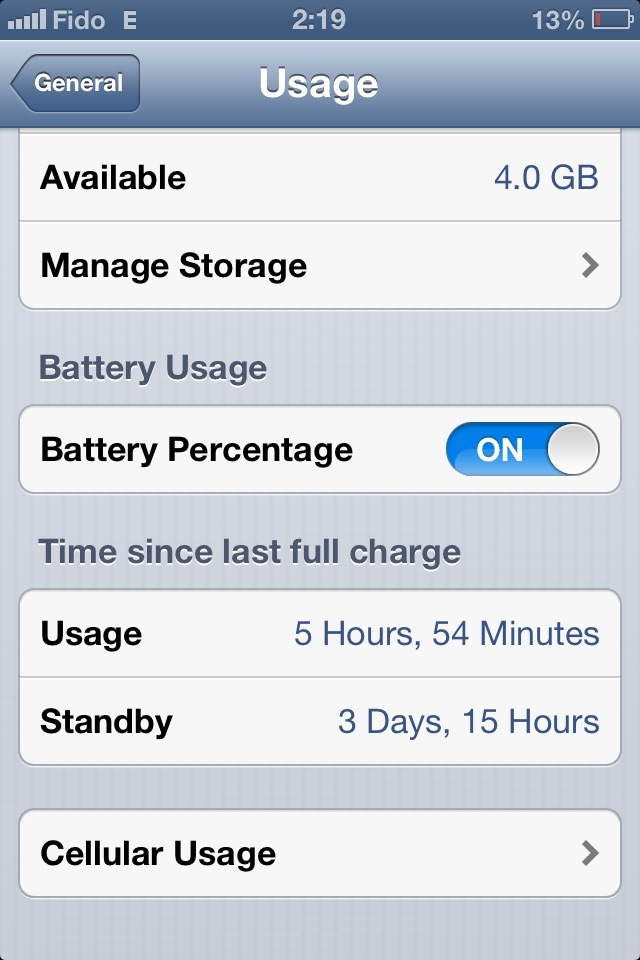
Lately, I’ve been able to go three to four work days between charges.
• Minimal phone calls, light web browsing using Opera with data compression, moderate texting and manual e-mail fetching.
• Not too much photography, some use of social media apps, no web-streaming audio.
• Wi-Fi and Bluetooth only when necessary.
• Mobile Internet operating on EDGE/2G.
• Screen brightness on manual, set to about 20%.
• Most app notifications deactivated.
I know that’s not the ideal setup for everyone … but I thought it would be interesting to share this information anyway, in case this happens to fit your own mobile phone usage habits.
(Heck, this isn’t always my usage pattern … just what’s been “normal” of late.)

20130123-000040.jpg

Share this:

  • Click to email a link to a friend (Opens in new window) Email
  • Click to share on Facebook (Opens in new window) Facebook
  • Click to share on X (Opens in new window) X
  • More
  • Click to share on Reddit (Opens in new window) Reddit
  • Click to share on Tumblr (Opens in new window) Tumblr
  • Click to share on LinkedIn (Opens in new window) LinkedIn
  • Click to share on Pinterest (Opens in new window) Pinterest
  • Click to print (Opens in new window) Print
Like Loading...

Mobile life on the EDGE

22 Sunday Jul 2012

Posted by Ricky Leong in Apple, iPhone, technology

≈ Leave a comment

Tags

2G, 3G, apple, cell phone, EDGE, iOS, iPhone, mobile, smartphone, tech

So here’s an update on my post last week about trying to extend my iPhone 4S battery life by switching mostly to 2G (EDGE) instead of using 3G.
On heavy usage, the difference is somewhat noticeable — nothing that blows my mind.
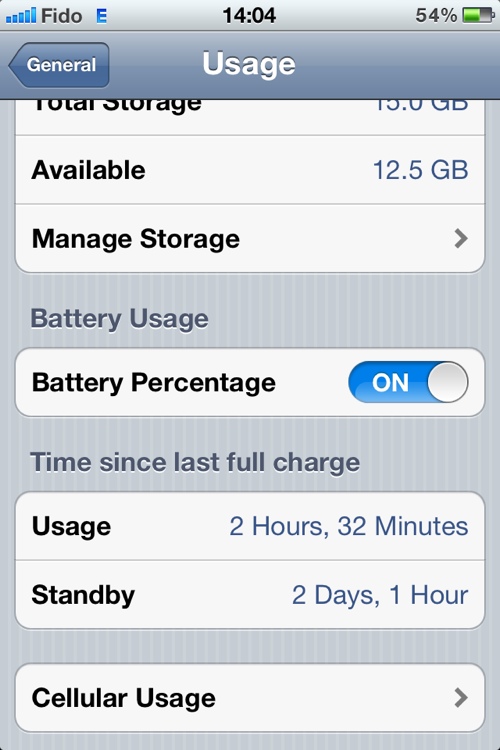
On light usage though, it’s a lot more interesting. As of 2 p.m. today, I’ve had my phone off the mains for a little over two full days and the battery shows 54% capacity remaining.

20120722-141540.jpg
That’s with very light photography,a few phone calls, a little bit of texting, some Internet radio streaming on my drive to work*, light web browsing using Opera Mobile as my browser.
My screen brightness is set to auto with the slider sitting above the letters gh of the word Brightness in the menu.
No video, a bit of Wi-Fi.
Not too shabby.
(*) On mobile Internet radio streaming, that’s where it shows the most noticeable change in battery usage. On my 15-minute commute to work, it typically drains 5% or 6% using 3G. On 2G, it only drains about 3%. That’s something resembling half the previous usage. Nice.

Share this:

  • Click to email a link to a friend (Opens in new window) Email
  • Click to share on Facebook (Opens in new window) Facebook
  • Click to share on X (Opens in new window) X
  • More
  • Click to share on Reddit (Opens in new window) Reddit
  • Click to share on Tumblr (Opens in new window) Tumblr
  • Click to share on LinkedIn (Opens in new window) LinkedIn
  • Click to share on Pinterest (Opens in new window) Pinterest
  • Click to print (Opens in new window) Print
Like Loading...

Hailing the return of slow Internet

15 Sunday Jul 2012

Posted by Ricky Leong in Apple, Internet, iPhone, technology

≈ 1 Comment

Tags

3G, apple, cell phone, EDGE, Internet, iOS, iPhone, iPhone 4S, mobile, mobile Internet, smartphone, technology

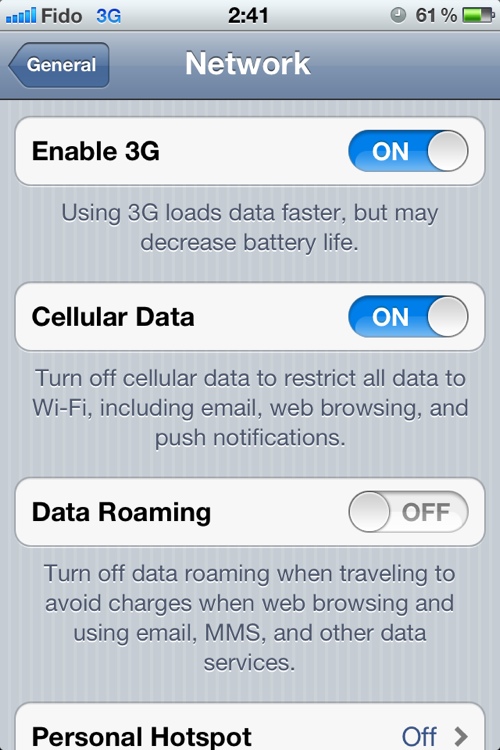
If you recall several months ago, when the iPhone 4S was new to my tech family, I lamented the loss of the ability to manually switch off 3G Internet and use EDGE (2G) instead.
Well in a case of severe catch-up, I’ve finally realized Apple corrected this omission in one of its firmware updates. Behold:

20120715-004129.jpg

Hooray!
I only discovered this within the last day, so I’ll report back later on whether this change will extend the battery life of my device, as is typically the case when mobiles are connected to EDGE versus 3G.
Another benefit of manually forcing your phone to use the slow lane is that in very congested environments, like Manhattan for example, there is heavy congestion on the popular 3G networks and on local WiFi, to the point where a slow but reliable EDGE connection is more useful and enjoyable than a fast but flaky mobile Internet connection.
(As proof, I can attest I was able to send texts and have crisp, clear phone conversations using Skype over T-Mobile’s 2G network in lower Manhattan last August, whereas AT&T’s 3G network was almost useless at times due to congestion.)
By the way, this post was written on my smartphone and uploaded using EDGE … Seems just dandy, thank you very much.

Share this:

  • Click to email a link to a friend (Opens in new window) Email
  • Click to share on Facebook (Opens in new window) Facebook
  • Click to share on X (Opens in new window) X
  • More
  • Click to share on Reddit (Opens in new window) Reddit
  • Click to share on Tumblr (Opens in new window) Tumblr
  • Click to share on LinkedIn (Opens in new window) LinkedIn
  • Click to share on Pinterest (Opens in new window) Pinterest
  • Click to print (Opens in new window) Print
Like Loading...

To-do over tethering

06 Friday Apr 2012

Posted by Ricky Leong in Apple, Internet, iPhone, technology

≈ Leave a comment

Tags

apple, Fido, iOS, iPhone, mobile Internet, Rogers, smartphone

If you’re having trouble with tethering and Personal Hotspot with your iPhone, don’t forget to check with your carrier.

20120406-013254.jpg

I noticed recently that my iPhone was no longer passing data to my devices with the Personal Hotspot function turned on.
I am subscribed to a data plan that allows for such activity and this function performed normally until the last few weeks.
After doing some online research, I tried some of the suggested tricks, including a network setting reset, to no avail.
At this point, I figured it was worth a call to Fido customer service.
The first agent confirmed to me I had a data plan that supports tethering and Personal Hotspot. He suggested there was some kind of firmware/software problem with my phone. He told me to check my OS version and to do a hard reboot of my phone before hanging up.
I was skeptical but I tried anyway. It turns out my apprehension was correct, as this did nothing to fix my problem.
I made another call to customer service. This time, I asked for the agent to make sure tethering was actually activated on my account. Lo and behold … it was not, although it should have been. The agent cheerfully rearranged my account details and voila! Tethering and Personal Hotspot were back in business.

Share this:

  • Click to email a link to a friend (Opens in new window) Email
  • Click to share on Facebook (Opens in new window) Facebook
  • Click to share on X (Opens in new window) X
  • More
  • Click to share on Reddit (Opens in new window) Reddit
  • Click to share on Tumblr (Opens in new window) Tumblr
  • Click to share on LinkedIn (Opens in new window) LinkedIn
  • Click to share on Pinterest (Opens in new window) Pinterest
  • Click to print (Opens in new window) Print
Like Loading...

Feature swiped?

08 Thursday Mar 2012

Posted by Ricky Leong in Apple, iPhone, technology

≈ Leave a comment

Tags

apple, iOS, iOS 5.1, iPhone, safari, smartphone, technology

A question for fellow iPhone users out there:
After upgrading to iOS 5.1, I appear to have lost the ability to swipe pages back and forward while in Safari. The only way to do that now is with the specified buttons in the lower toolbar.
Is anyone else experiencing this?

Share this:

  • Click to email a link to a friend (Opens in new window) Email
  • Click to share on Facebook (Opens in new window) Facebook
  • Click to share on X (Opens in new window) X
  • More
  • Click to share on Reddit (Opens in new window) Reddit
  • Click to share on Tumblr (Opens in new window) Tumblr
  • Click to share on LinkedIn (Opens in new window) LinkedIn
  • Click to share on Pinterest (Opens in new window) Pinterest
  • Click to print (Opens in new window) Print
Like Loading...

My first five days using iPhone 4S

22 Saturday Oct 2011

Posted by Ricky Leong in Apple, iPhone, technology

≈ Leave a comment

Tags

apple, iOS, iOS 5, iPhone, iPhone 4S, Siri, smartphone, technology

It’s been a week since Apple’s iPhone 4S went on sale in many countries, including Canada.
As promised, here are more of my thoughts on the device.

Continue reading →

Share this:

  • Click to email a link to a friend (Opens in new window) Email
  • Click to share on Facebook (Opens in new window) Facebook
  • Click to share on X (Opens in new window) X
  • More
  • Click to share on Reddit (Opens in new window) Reddit
  • Click to share on Tumblr (Opens in new window) Tumblr
  • Click to share on LinkedIn (Opens in new window) LinkedIn
  • Click to share on Pinterest (Opens in new window) Pinterest
  • Click to print (Opens in new window) Print
Like Loading...

iPhone 4S — Talking with Siri

19 Wednesday Oct 2011

Posted by Ricky Leong in Apple, iPhone, technology

≈ Leave a comment

Tags

apple, iOS 5, iPhone, iPhone 4S, Siri, smartphone, technology

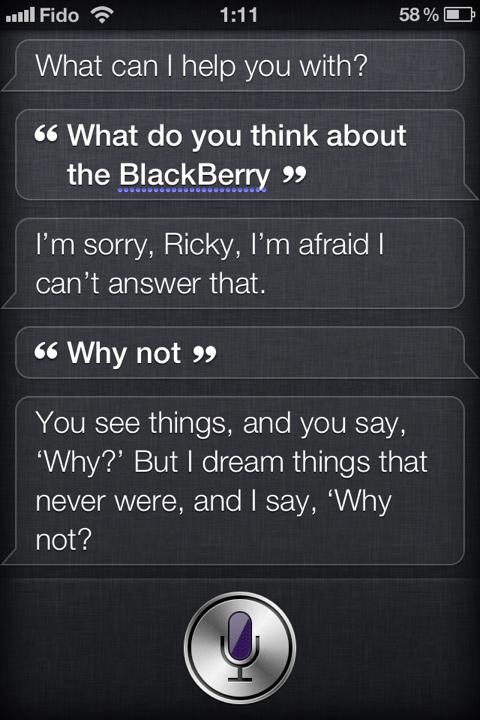
Because everyone else is doing, so I might as well pile in …

20111019-011417.jpg

Share this:

  • Click to email a link to a friend (Opens in new window) Email
  • Click to share on Facebook (Opens in new window) Facebook
  • Click to share on X (Opens in new window) X
  • More
  • Click to share on Reddit (Opens in new window) Reddit
  • Click to share on Tumblr (Opens in new window) Tumblr
  • Click to share on LinkedIn (Opens in new window) LinkedIn
  • Click to share on Pinterest (Opens in new window) Pinterest
  • Click to print (Opens in new window) Print
Like Loading...
← Older posts

Greetings

Welcome to rickyleong.com and thanks for stopping by. Pictured in the header above is Calgary’s skyline seen from McHugh Bluff.

About me


Journalist by trade, photographer for fun. I help make multi-platform content at Postmedia in Calgary. Opinions expressed here are my own.

More of my sites

  • View Ricky Leong's profile on LinkedIn
  • My personal Mastodon feed
  • Daily Tusk news links on Mastodon
  • Photos on Flickr
  • Videos on YouTube
  • My columns at calgarysun.com

Image licensing

Most of my photos are licensed under a Creative Commons Attribution-NonCommercial-NoDerivatives 4.0 International License.
Creative Commons License
If you require an image for commercial or other purposes not covered by the CC licence, or if you are in doubt as to how this licence applies, please feel free to contact me: rleong101(at)gmail.com

Create a website or blog at WordPress.com

  • Subscribe Subscribed
    • Ricky Leong
    • Join 1,180 other subscribers
    • Already have a WordPress.com account? Log in now.
    • Ricky Leong
    • Subscribe Subscribed
    • Sign up
    • Log in
    • Report this content
    • View site in Reader
    • Manage subscriptions
    • Collapse this bar
 

Loading Comments...
 

    %d