• Home
  • About this blog

Ricky Leong

~ Random Musings

Ricky Leong

Tag Archives: tech

My first 12 hours with iOS 7

19 Thursday Sep 2013

Posted by Ricky Leong in Apple, iPad, iPhone, technology

≈ 3 Comments

Tags

apple, iOS, iOS 7, iPad, iPhone, mobile, smartphone, tablet, tech, technology

Apple unleashed its newest operating system on the world Wednesday. You’ll find my preliminary thoughts on iOS 7 interspersed with some screenshots from my phone.

20130919-001924.jpg

As of this writing, tech websites are reporting iOS 7 has already been installed on some 15% of Apple mobile devices so far.
I loaded iOS 7 into my iPhone 4S this morning and my first impressions are generally positive. Quickly, on the things that matter:
• The phone still works as it should. I remembered all my ringtone and message sound settings. I even took a phone call today (!) and everything went fine.
• The battery life was just as good as it was in iOS 6. With the Wi-Fi on at work and a 2G (EDGE) connection to my service provider, no Bluetooth, manual fetching of e-mails, minimal push notifications, some location services off and moderate use today, the phone’s charge went from 99% to 70% between 1 p.m. and midnight. Not too shabby.
• No apps misfired, to my knowledge.

20130919-001956.jpg

The installation process was somewhat lengthy. From the time I told my phone to download until the iOS 7 setup menus became active, it took almost an hour.
Unlike some other iDevice users, however, I had no trouble downloading the operating system.
(As I write this, my third-generation iPad is being updated. It doesn’t appear to be taking quite as long.)

20130919-002011.jpg

The interface is gorgeous. I am particularly fond of the extra-thin font is use for such things as the clock and keypad on the lock screen.
I’m also pleased at the ability to adjust the default font size, for apps that support this feature.
The parallax between the icons and the wallpaper is a little off-putting. Frankly, it hasn’t helped me (yet) to enhance the “layering” of the operating system, as Apple was pitching when iOS 7 was first introduced to the public.

20130919-002026.jpg

The control centre is an idea whose time has come. I keep forgetting it’s there and continue to dig into my Settings menus to gain access to controls for Wi-Fi and Bluetooth.
The new operating system offers a selection of cool wallpapers, in case you don’t have something special set aside. One set has dynamic wallpaper, with background bubbles that move around as your device moves.

20130919-002552.jpg

20130919-002604.jpg

20130919-002107.jpg

Apple promised the migration to a whole new interface wouldn’t be painful, that it would be “instantly recognizable”, to quote Jony Ive from a video from Apple’s website.
That statement mostly holds true. Take the Messages interface, for example. Blue speech bubbles for iMessage; green for regular SMS. And if you look at the screenshot of the Settings menu above, you’ll see the hierarchy is pretty much identical to how it was in iOS 6.
However, there are few changes that break with the familiarity of the old versions of iOS.
• Swiping to delete (in Mail, for example) only works if you swipe right-to-left.
• You still double-click the home button to switch apps. To kill an app, you hold your finger on a screenshot and flick it upward … and it magically disappears.
• There is a new method to invoke Spotlight. Flick down from anywhere in the middle of the screen.
• Facebook and Twitter posting are gone from the Notification Centre.
• Weather remains as text describing current conditions in the Notification Centre — but only if “Weather” in location services is enabled.
• The Newsstand folder no longer behaves as an app. (I never understood why it did and I always found that annoying. I’m glad this was fixed.)
• You can set your apps to automatically update as fixes become available. This is not mandatory, however.
• The overview of your photos is grouped in specific time periods, in what Apple calls “Moments” and “Collections”. The behaviour of photo albums remains unchanged.
• The screen now fades in and out instead of turning immediately on or off.

20130919-010848.jpg

Those are some of the things I noticed in my first half-day of using iOS 7. I’ll share with you any new discoveries and/or oddities that might come along as I become more familiarized with it.
0.000000 0.000000

Share this:

  • Click to email a link to a friend (Opens in new window) Email
  • Click to share on Facebook (Opens in new window) Facebook
  • Click to share on X (Opens in new window) X
  • More
  • Click to share on Reddit (Opens in new window) Reddit
  • Click to share on Tumblr (Opens in new window) Tumblr
  • Click to share on LinkedIn (Opens in new window) LinkedIn
  • Click to share on Pinterest (Opens in new window) Pinterest
  • Click to print (Opens in new window) Print
Like Loading...

Flickr changes: More convoluted than it needs to be

21 Tuesday May 2013

Posted by Ricky Leong in Flickr, Internet, photography, random, technology

≈ Leave a comment

Tags

flickr, Internet, photography, tech, technology

ThomasHawkBlogFlickr

I was afraid of this — some wrinkle in the fine print of the massive changes to photo-sharing website Flickr made yesterday.
There’s nothing wrong with the esthetic improvements, to my mind.
All the trouble lies under the hood.
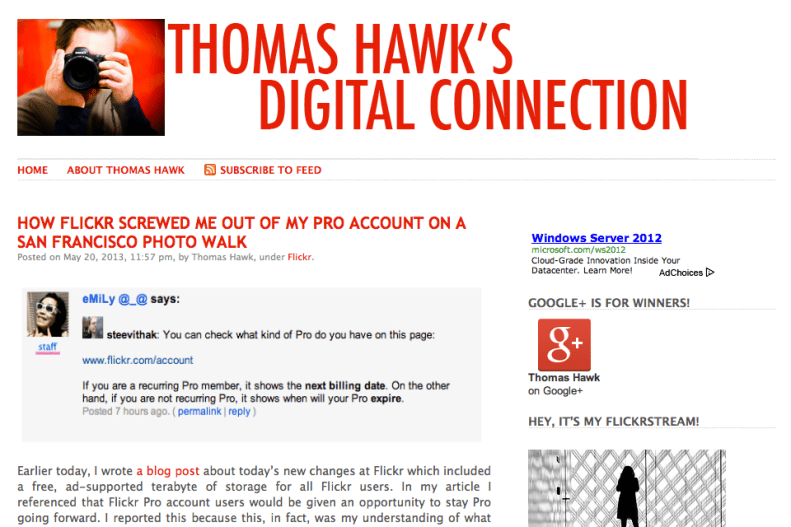
As blogger/photographer Thomas Hawk found out, the status of “Pro” accounts wasn’t as static as first thought.
Certain people’s current Pro account will eventually expire and those users will be forced into a new upgrade regime — $49.99 annually to remove ads; $499.99 annually to double space allocation to two terabytes. (That second one is not a typo: Four-hundred ninety-nine dollars and ninety-nine cents.)
Other Pro accounts will be allowed to continue.
It is still unclear to me how this Pro vs. Ad-Free/Doublr is suppose to shake down.
Will someone at Flickr please provide a CLEAR explanation of who is entitled to what? Who still has access to old-style Flickr Pro and who doesn’t?
What entitlements that were previously reserved for Pro users will be available to all users with the new free program?
How do I find out how much space I still have? One terabyte is a lot of data but I like to be organized …
Flickr has a few answers here: http://www.flickr.com/help/limits/#150582914
Still, it feels as if I’m information is being withheld or poorly explained.
I just tried to buy two more years under the current Pro regime … and it appears I’ve succeeded — even though the documentation states I shouldn’t be able to do so.
What changed in the last few hours? Has Flickr changed who’s entitled to a Pro account?
Essentially, I’d like to know how screwed I am when my Pro account expires … if it ever does.
This is turning out to be more confusing that it should be.

p.s. In the minutes after I took that screen capture of Thomas Hawk’s blog, he was also able to extend his Flickr Pro account. He is (not surprisingly) ecstatic.

Share this:

  • Click to email a link to a friend (Opens in new window) Email
  • Click to share on Facebook (Opens in new window) Facebook
  • Click to share on X (Opens in new window) X
  • More
  • Click to share on Reddit (Opens in new window) Reddit
  • Click to share on Tumblr (Opens in new window) Tumblr
  • Click to share on LinkedIn (Opens in new window) LinkedIn
  • Click to share on Pinterest (Opens in new window) Pinterest
  • Click to print (Opens in new window) Print
Like Loading...

Smart-alec spellcheck

08 Friday Feb 2013

Posted by Ricky Leong in fun, random, technology

≈ Leave a comment

Tags

Adobe, fail, fun, funny, InDesign, spellcheck, tech, technology

20130208-163315.jpg

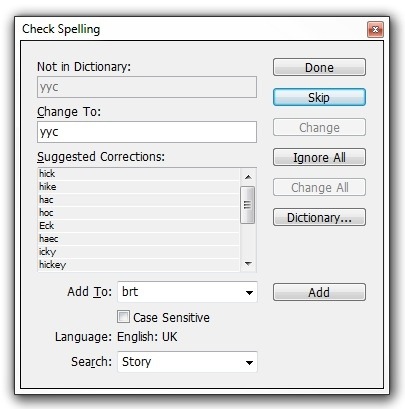
Courtesy InDesign … Here’s an unflattering spellcheck suggestion for YYC, the airport code for Calgary.
(The second suggestion, however, is spot on.)

Share this:

  • Click to email a link to a friend (Opens in new window) Email
  • Click to share on Facebook (Opens in new window) Facebook
  • Click to share on X (Opens in new window) X
  • More
  • Click to share on Reddit (Opens in new window) Reddit
  • Click to share on Tumblr (Opens in new window) Tumblr
  • Click to share on LinkedIn (Opens in new window) LinkedIn
  • Click to share on Pinterest (Opens in new window) Pinterest
  • Click to print (Opens in new window) Print
Like Loading...

Power post

23 Wednesday Jan 2013

Posted by Ricky Leong in Apple, technology

≈ Leave a comment

Tags

apple, battery, iOS, iPhone, iPhone 4S, smartphone, tech, technology

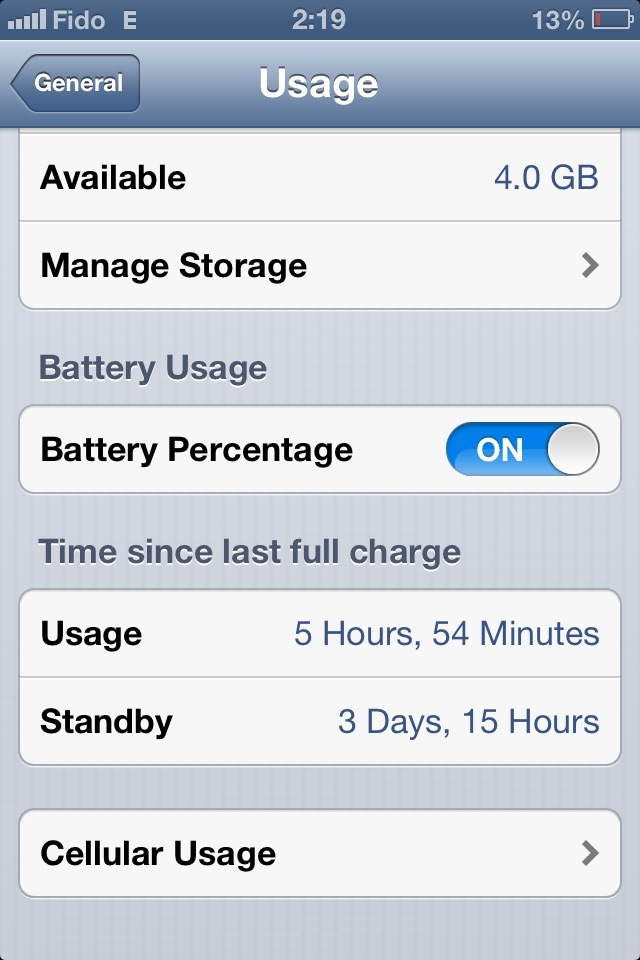
Another follow-up message relating to a favourite topic of mine: The battery life of my Apple iPhone 4S.
Lately, I’ve been able to go three to four work days between charges.
• Minimal phone calls, light web browsing using Opera with data compression, moderate texting and manual e-mail fetching.
• Not too much photography, some use of social media apps, no web-streaming audio.
• Wi-Fi and Bluetooth only when necessary.
• Mobile Internet operating on EDGE/2G.
• Screen brightness on manual, set to about 20%.
• Most app notifications deactivated.
I know that’s not the ideal setup for everyone … but I thought it would be interesting to share this information anyway, in case this happens to fit your own mobile phone usage habits.
(Heck, this isn’t always my usage pattern … just what’s been “normal” of late.)

20130123-000040.jpg

Share this:

  • Click to email a link to a friend (Opens in new window) Email
  • Click to share on Facebook (Opens in new window) Facebook
  • Click to share on X (Opens in new window) X
  • More
  • Click to share on Reddit (Opens in new window) Reddit
  • Click to share on Tumblr (Opens in new window) Tumblr
  • Click to share on LinkedIn (Opens in new window) LinkedIn
  • Click to share on Pinterest (Opens in new window) Pinterest
  • Click to print (Opens in new window) Print
Like Loading...

Mobile life on the EDGE

22 Sunday Jul 2012

Posted by Ricky Leong in Apple, iPhone, technology

≈ Leave a comment

Tags

2G, 3G, apple, cell phone, EDGE, iOS, iPhone, mobile, smartphone, tech

So here’s an update on my post last week about trying to extend my iPhone 4S battery life by switching mostly to 2G (EDGE) instead of using 3G.
On heavy usage, the difference is somewhat noticeable — nothing that blows my mind.
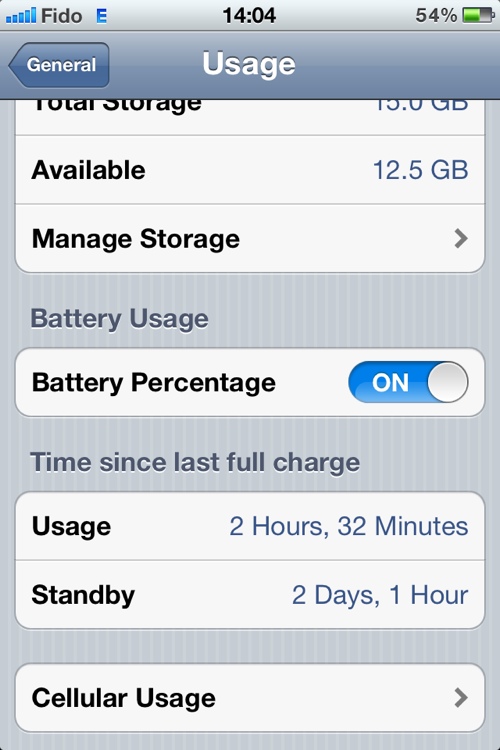
On light usage though, it’s a lot more interesting. As of 2 p.m. today, I’ve had my phone off the mains for a little over two full days and the battery shows 54% capacity remaining.

20120722-141540.jpg
That’s with very light photography,a few phone calls, a little bit of texting, some Internet radio streaming on my drive to work*, light web browsing using Opera Mobile as my browser.
My screen brightness is set to auto with the slider sitting above the letters gh of the word Brightness in the menu.
No video, a bit of Wi-Fi.
Not too shabby.
(*) On mobile Internet radio streaming, that’s where it shows the most noticeable change in battery usage. On my 15-minute commute to work, it typically drains 5% or 6% using 3G. On 2G, it only drains about 3%. That’s something resembling half the previous usage. Nice.

Share this:

  • Click to email a link to a friend (Opens in new window) Email
  • Click to share on Facebook (Opens in new window) Facebook
  • Click to share on X (Opens in new window) X
  • More
  • Click to share on Reddit (Opens in new window) Reddit
  • Click to share on Tumblr (Opens in new window) Tumblr
  • Click to share on LinkedIn (Opens in new window) LinkedIn
  • Click to share on Pinterest (Opens in new window) Pinterest
  • Click to print (Opens in new window) Print
Like Loading...
Newer posts →

Greetings

Welcome to rickyleong.com and thanks for stopping by. Pictured in the header above is Calgary’s skyline seen from McHugh Bluff.

About me


Journalist by trade, photographer for fun. I help make multi-platform content at Postmedia in Calgary. Opinions expressed here are my own.

More of my sites

  • View Ricky Leong's profile on LinkedIn
  • My personal Mastodon feed
  • Daily Tusk news links on Mastodon
  • Photos on Flickr
  • Videos on YouTube
  • My columns at calgarysun.com

Image licensing

Most of my photos are licensed under a Creative Commons Attribution-NonCommercial-NoDerivatives 4.0 International License.
Creative Commons License
If you require an image for commercial or other purposes not covered by the CC licence, or if you are in doubt as to how this licence applies, please feel free to contact me: rleong101(at)gmail.com

Create a website or blog at WordPress.com

  • Subscribe Subscribed
    • Ricky Leong
    • Join 1,180 other subscribers
    • Already have a WordPress.com account? Log in now.
    • Ricky Leong
    • Subscribe Subscribed
    • Sign up
    • Log in
    • Report this content
    • View site in Reader
    • Manage subscriptions
    • Collapse this bar
 

Loading Comments...
 

    %d